Why Is My Phone So Slow? Common Reasons and How to Fix Them
Is your phone lagging? The usual causes are full storage, old software, background apps, an aging battery or slow internet. Here's how to check each one.

The short answer
Phones can slow down for several reasons, including low storage space, too many apps running in the background, an outdated operating system, or a weak internet connection. An aging battery or even malware can also contribute to performance issues.
Key takeaways
- Low storage space is a major cause of slow phone performance.
- Too many apps running at once can consume memory and processing power.
- Outdated software or a poor internet connection can also lead to slowdowns.
- An old battery or malware might be making your device sluggish.
- Simple steps like clearing storage and updating software can often improve speed.
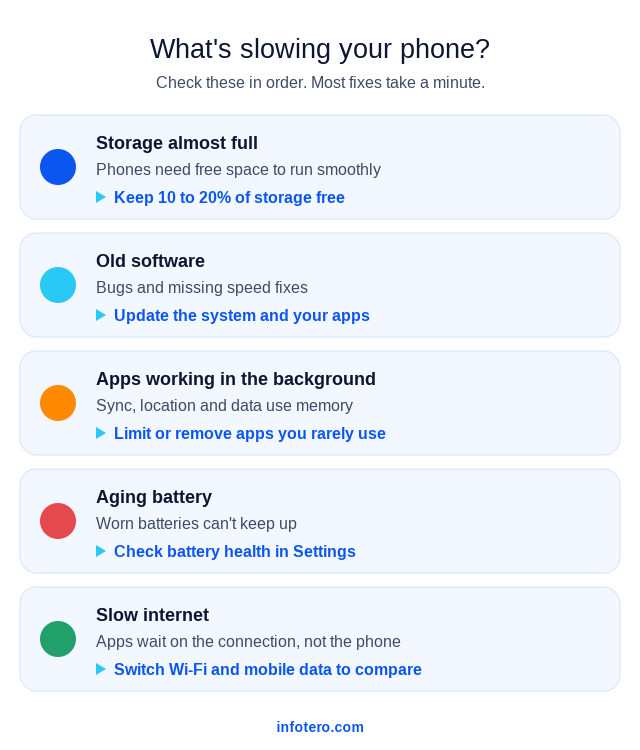
Most slow phones have one of five causes: storage that’s almost full, software that’s out of date, too many apps working in the background, a worn battery, or a slow internet connection. Malware is possible but much less common. The good news is that you can check all five in about ten minutes, starting with the quickest.
Step 1: Restart the phone first
A restart clears out apps and processes that got stuck, which is behind a lot of short-term lag. If your phone hasn’t been switched off in weeks, do this before anything else. If it’s fast after the restart but slows down again within a day or two, keep going through the checks below.
Step 2: Check your storage
Phones need free space for temporary system files and cached data. When storage gets very low, those background jobs struggle and the whole phone feels sluggish. Aim to keep 10 to 20 percent of your storage free. On a 128 GB phone, that’s roughly 13 to 25 GB. Apple says an iPhone or iPad should have at least 1 GB free at the very minimum.
To see what’s using the space:
- iPhone: Settings > General > iPhone Storage
- Android: Settings > Storage (on Samsung: Settings > Battery and device care > Storage)
Photos, videos and big apps are usually at the top of the list. On Android, a browser or social media app with a large cache can also take up a surprising amount of room. Our guide on how to free up storage on your phone walks through the fastest ways to clear it.
Step 3: Update the software
An outdated operating system can carry bugs that slow the phone down, and updates often include performance fixes. Update your apps too, since an old version of one app can misbehave on newer system software.
- iPhone: Settings > General > Software Update
- Android: Settings > System > Software update (on Samsung: Settings > Software update)
After a big update, a phone can feel slower for a day or two while it re-indexes files in the background. That settles on its own.
Step 4: Look at apps running in the background
Every app that’s running uses some of the phone’s short-term memory (RAM) and processing power. On Android, apps with auto-sync, location access or background data turned on can add up and slow things down. Check Settings > Apps, and turn off background activity for apps you rarely use, or uninstall them.
You don’t need to swipe away every app all the time. Force closing apps for no reason can actually make the phone slower, because it has to reload everything when you open them again. Close an app only if it’s frozen or misbehaving.
Step 5: Check the battery
All rechargeable batteries lose capacity and peak performance as they age chemically. An old battery can’t always deliver power quickly enough, so the phone may run slower to avoid shutting down unexpectedly.
- iPhone: Settings > Battery > Battery Health. If maximum capacity is low or it says service is recommended, a battery replacement often brings the speed back.
- Android: many phones show battery health under Settings > Battery or in the maker’s support app.
Also check that Low Power Mode or a battery saver isn’t turned on, since those modes deliberately slow some features to save power. Heat matters too: an iPhone or iPad can slow down when it gets too hot or too cold.
Step 6: Test your internet connection
If apps and web pages are slow but the phone itself opens menus quickly, the problem is probably the connection, not the phone. Try switching between Wi-Fi and mobile data. If one is much faster, the other is the issue. You can check your internet speed to be sure.
Step 7: Rule out malware
Malicious apps can use your phone’s resources in the background and change settings, which makes the device slow or unpredictable. It’s worth checking if the slowdown came with other signs, like ads appearing outside your apps or apps you don’t remember installing. Our guide to signs your phone has a virus explains what to look for.
When the phone is simply old
Phones naturally get slower over time, because new apps and system updates expect more processing power than older models have. Hardware faults, such as failing memory or an unresponsive touch screen, can also make a phone feel slow. If you’ve tried every step above and it’s still sluggish, back up your data and consider a factory reset. If that doesn’t help, it may be time for a battery replacement or a new phone.
Related: Why your phone battery is draining fast · Why Android apps keep crashing
Frequently asked questions
Does a full phone slow it down?
Yes, having too many photos, videos, and apps can consume a phone's memory and reduce its processing power, leading to slower performance. Phones perform best when they have free storage space available for temporary system files and cached data.
Can an old battery make my phone slow?
Yes, a faulty or aging battery can contribute to a phone running slowly. All rechargeable batteries lose effectiveness as they chemically age, diminishing their capacity and peak performance over time.
Does closing apps help speed up my phone?
Closing unused apps can free up RAM (short-term memory) and processing power, which can help improve your phone's speed. However, force closing apps unnecessarily can sometimes slow down a device because reloading all data when reopening takes longer.
How much free storage should I keep on my phone?
Phones perform best when they have free storage space available. It is recommended to maintain at least 1 GB of free space on an iPhone or iPad, and keeping at least 10-20% of total storage free can help any device run smoothly.
Sources
Facts in this article were checked against these sources. Spotted an error? Report a correction.
- 1
- 2Speed up a slow Android device - Android Helpsupport.google.com
- 3
- 4Why Is My Phone So Slow? + Quick Fixes for Android & iPhonebitdefender.com
- 5
- 6If your iPhone or iPad is running slow - Apple Supportsupport.apple.com